
Tesla Model 3: Breathers - HV Battery (Remove and Replace)
Tesla Model 3 2017-2026 Service Manual / Battery System / HV Battery Enclosure / Breathers - HV Battery (Remove and Replace)
Remove
- Remove the mid aero shield panel. See Panel - Aero Shield - Mid (Remove and Replace).
.png)
- Release the fir tree clips that attach the coolant hoses to the LH shear plate.
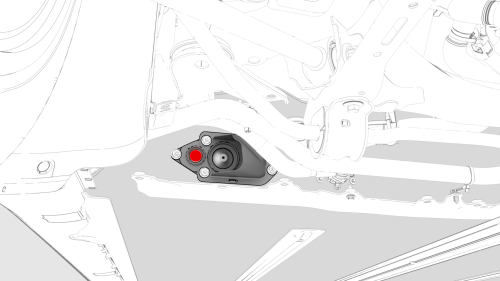
- Remove and discard the HV battery breather from the LH HV battery vent shroud assembly.
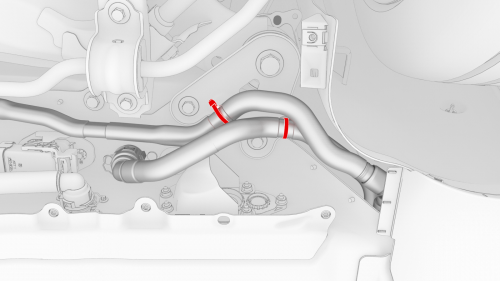
- Release the fir tree clips that attach the coolant hoses to the RH shear plate.
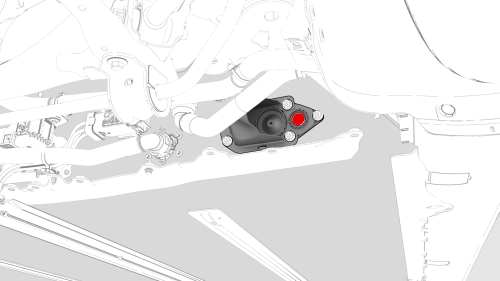
- Remove and discard the HV battery breather from the RH HV battery vent
shroud assembly.
Install
- Use an IPA wipe to clean the holes where the breathers will install.
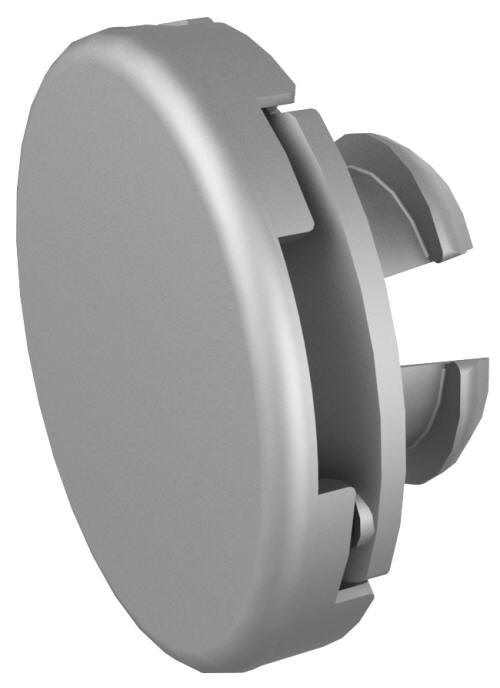
- Install a new HV battery breather into the LH HV battery vent shroud assembly
Note: Press at the center of the breather, and then press at 3 points forming a triangle pattern on the breather, to make sure that the HV battery breather is fully seated.
- Apply sideways pressure on the HV battery breather at several locations to verify that it is attach in the LH HV battery vent shroud.
- Fasten the fir tree clips that attach the coolant hoses to the LH shear plate.
- Install a new HV battery breather into the RH HV battery vent shroud assembly
Note: Press at the center of the breather, and then press at 3 points forming a triangle pattern on the breather, to make sure that the HV battery breather is fully seated.
- Apply sideways pressure on the HV battery breather at several locations to verify that it is attach in the RH HV battery vent shroud.
- Fasten the fir tree clips that attach the coolant hoses to the RH shear plate.
- Install the mid aero shield panel. See Panel - Aero Shield - Mid (Remove and Replace).
READ NEXT:
 Cover - HV Probe - HV Battery (Remove and Replace)
Warning:
Only technicians who have been trained in High Voltage Awareness are
permitted to perform this procedure. Proper personal protective equipment (PPE)
and insulating HV gloves with a minimum
Cover - Penthouse (Remove and Replace)
SPECIAL TOOLS
Asy, Service Cover, Penthouse, Model 3 (1127845-00-A)
Skt, 1/4in Dr, 5-Lobe Torx Plus External (1059330-00-B)
Wrench, Torque + Angle, 1/4" Dr (1076971-02-A)
Cap, Logic Conn, Inv, 3DU
SEE MORE:
Harness - Penthouse - HV Battery (Remove and Replace)
Harness - Penthouse - HV Battery- Remove
SPECIAL TOOLS
Ratchet, 1/4" Sq Dr, HV Insulated (1057602-00-A)
Ext Bar, Wobble, 1/4" Dr, HV Insulated (1057603-00-A)
Skt, 1/4" Sq Dr, 13mm, HV Insulated (1057606-00-A)
Magnet, Flexible, HV Insulated, 18" (1057607-00-A)
Connector Removal, Coolant, PCS, M3 (1
Buckle - 1st Row - LH (Remove and Replace)
Remove
Open all four doors, lower all four windows, and then move both front
seats forward.
Remove the 2nd row lower seat cushion. See Seat Cushion - Lower - 2nd
Row (Remove and Replace).
Remove the rear underhood apron. See Underhood Apron - Rear (Remove and
Replace).
Remove the LH ins
© 2019-2026 Copyright www.tmodel3.com
