Tesla Model 3 Owners & Service Manuals

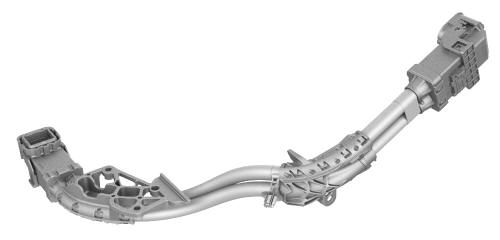
Tesla Model 3: Harness - HV Battery to Rear Drive Unit (Remove and Replace)

Tesla Model 3 2017-2026 Service Manual / High Voltage System / HV Harnesses / Harness - HV Battery to Rear Drive Unit (Remove and Replace)

Harness - HV Battery to Rear Drive Unit - Remove

SPECIAL TOOLS

Lever Lock, HV Connector, Model 3 (1140311-00-A)

Remove

  1. Remove the rear subframe assembly. See Subframe Assembly - Rear (Remove and Install).

  Harness - HV Battery to Rear Drive Unit - Remove

  1. Disconnect the electrical harness from the inverter low voltage connector.

  Harness - HV Battery to Rear Drive Unit - Remove

  1. Release the clip that attaches the low voltage electrical harness to the inverter.

  Harness - HV Battery to Rear Drive Unit - Remove

  1. Release the clip, disconnect the rear drive unit inlet hose from the inverter coolant inlet, and then plug the inlet.

  Harness - HV Battery to Rear Drive Unit - Remove

  1. Release the clip that attaches the rear drive unit inlet hose to the HV harness bracket, and then remove the hose from the rear drive unit.

  Harness - HV Battery to Rear Drive Unit - Remove

  1. Remove the bolt that attaches the HV harness bracket to the inverter.

  Harness - HV Battery to Rear Drive Unit - Remove

  1. Slide the release to unlock the HV harness connector.

  Harness - HV Battery to Rear Drive Unit - Remove

  1. Lift the handle on HV harness connector, disconnect the harness from the inverter connector, and then remove the harness from the rear drive unit.

Harness - HV Battery to Rear Drive Unit - Install

Install

  1. Fully raise the handle on the rear drive unit HV electrical harness.

  Harness - HV Battery to Rear Drive Unit - Install

  1. Attach the HV connector lever lock onto the back of the HV electrical harness.
  2. Firmly connect the HV electrical harness to the inverter connector.

Caution: Make sure that the harness fits the connector squarely and tightly.

  1. While pressing the harness to the connector, remove the HV connector lever lock.

  Harness - HV Battery to Rear Drive Unit - Install

  1. While pressing the harness to the connector, fully lower the handle.

  Harness - HV Battery to Rear Drive Unit - Install

  1. Slide the release to lock the HV electrical harness.

  Harness - HV Battery to Rear Drive Unit - Install

  1. Install the bolt that attaches the HV harness bracket to the inverter. Torque 6 Nm

  Harness - HV Battery to Rear Drive Unit - Install

  1. Connect the rear drive unit inlet hose to the inverter coolant inlet, and then fasten the clip.

  Harness - HV Battery to Rear Drive Unit - Install

  1. Fasten the clip that attaches the rear drive unit inlet hose to the HV harness bracket.

  Harness - HV Battery to Rear Drive Unit - Install

  1. Connect the electrical harness to the inverter low voltage connector.

  Harness - HV Battery to Rear Drive Unit - Install

  1. Fasten the clip that attaches the low voltage electrical harness to the inverter.
  2. Install the rear subframe assembly. See Subframe Assembly - Rear (Remove and Install)

    READ NEXT:

     External Charging Connectors

    Mobile Connector Firmware Update - CHAdeMO Charging Adapter CAN Setup Connect the USB-CAN dongle to a laptop that is equipped with Toolbox Connect the CHAdeMO CAN programming connector to the USB-CAN

    SEE MORE:

     Mount - Front Drive Unit - LH (Remove and Replace)

    Remove Remove the front subframe assembly from the vehicle. See Subframe Assembly - Front (Dual Motor) (Remove and Install). Release the clips that attach the front drive unit harness to the front drive unit inverter. Remove the bolts that attach the LH front drive unit mount to the

     Security Settings

    About the Security System If Model 3 does not detect an authenticated phone, key fob, or key card and a locked door or trunk is opened, an alarm sounds and the headlights and turn signals flash. To deactivate the alarm, press any button on the mobile app or tap your key card or key fob against

    © 2019-2026 Copyright www.tmodel3.com