
Tesla Model 3: Reflector - Fascia - Rear - LH (Remove and Replace)
Tesla Model 3 2017-2026 Service Manual / Electrical / Exterior Lights / Reflector - Fascia - Rear - LH (Remove and Replace)
Remove
- Remove the rear fascia assembly and place it on a padded surface. See Fascia - Rear (Remove and Install).
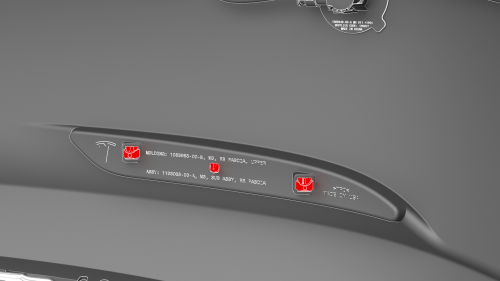
- Remove the rear fascia assembly and place it on a padded surface. See Fascia - Rear (Remove and Install).
- Release the clips (x2) that attach the LH rear fascia reflector to the
rear fascia assembly, and remove the reflector from the fascia.
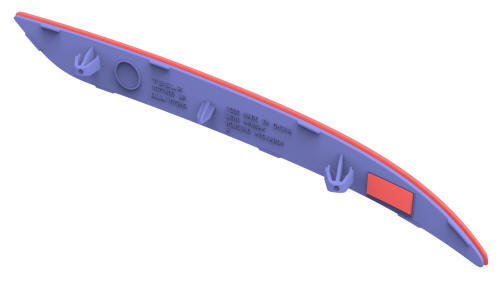
Install
Installation procedure is the reverse of removal.
READ NEXT:
 Antenna - Bluetooth Passive Entry - Front (Remove and Replace)
Remove
Raise and support the vehicle. See
Raise Vehicle - 2 Post Lift.
Remove the rear underhood apron. See
Underhood Apron - Rear (Remove and Replace).
Remove the cabin intake duct. See
Duct -
Antenna - Bluetooth Passive Entry - Rear (Remove and Replace)
Remove
Remove the rear fascia. See
Fascia - Rear (Remove and Install).
Disconnect the electrical wiring harness connector from the rear
Bluetooth passive entry module.
Remove the bolt a
SEE MORE:
Seatbelt - 2nd Row - Center (Remove and Replace)
Remove
Remove the 2nd row lower seat cushion. See Seat Cushion - Lower - 2nd
Row (Remove and Replace).
Remove the rear underhood apron. See Underhood Apron - Rear (Remove and
Replace).
Disconnect 12V power. See 12V Power (Disconnect and Connect).
Remove the LH 2nd row buckle. See Buckle -
Charging
General
Tesla Model 3 is a battery electric vehicle, meaning the High Voltage (HV)
battery needs to be charged by a charging station after finishing driving. The
touchscreen and smart phone app inform the driver of the state of charge and the
expected remaining range
The charge port is located on
© 2019-2026 Copyright www.tmodel3.com
